> ## Content Index
> Fetch the complete content index at: https://debug.my.id/llms.txt
> Use this file to discover other available public pages before exploring further.
# Mengatasi error Exit with code 1 due to network error: ContentNotFoundError di wkhtmltopdf atau wkhtmltoimage via Snappy PDF
- URL: https://debug.my.id/exit-with-code-1-contentnotfounderror/
- Published: 2018-03-19T04:34:00.000Z
- Updated: 2025-06-24T16:24:40.000Z
- Author: Tukang Debug
- Tags: Laravel, PHP, Tip/trik
Jika anda menggunakan [wkhtmltopdf](https://wkhtmltopdf.org/index.html?ref=debug.my.id) atau wkhtmltoimage, via wrapper seperti Snappy PDF atau yang lain, untuk mengkonversi suatu halaman html menjadi pdf atau gambar, mungkin anda akan mengalami error [ **Exit with code 1 due to network error: ContentNotFoundError**](https://debug.my.id/exit-with-code-1-contentnotfounderror/) .
Di bawah ini adalah contoh screenshot error tersebut
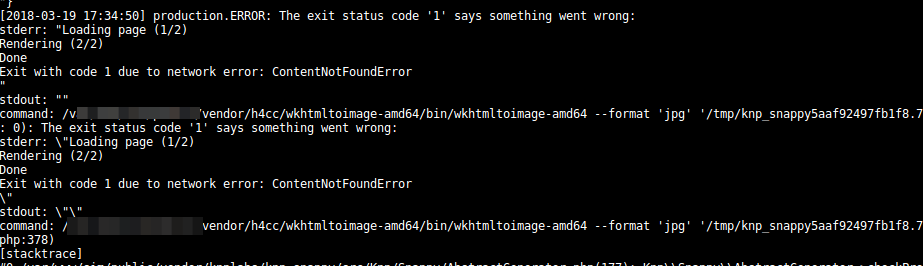
Error ini, dari pengalaman saya pribadi, dikarenakan file asset baik itu font, gambar, css atau file-file external lain tidak dapat ditemukan. Oleh karena itu, salah satu cara paling mudah untuk mengatasi masalah ini adalah dengan mengubah path semua file asset menjadi absolute dengan menyertakan hostname-nya.
Di bawah ini adalah beberapa contoh cara mengubah file path asset:
```html
 ```
diubah menjadi :
```html
```
diubah menjadi :
```html
 ```
atau jika anda menggunakan [**Laravel**](https://debug.my.id/exit-with-code-1-contentnotfounderror/), maka dapat diubah dengan menggunakan **asset** :
```html
```
atau jika anda menggunakan [**Laravel**](https://debug.my.id/exit-with-code-1-contentnotfounderror/), maka dapat diubah dengan menggunakan **asset** :
```html
}}) ```
Contoh jika anda menggunakan **Laravel** :
```css
@font-face {
font-family: Matchmaker;
src: url('/webfont/Matchmaker.ttf');
}
page {
width: 29.7cm;
height: 21cm;
position: relative;
background: url("/static/img/sertifikat/bg.png')") no-repeat center;
}
```
css di atas dapat diubah menjadi :
```css
@font-face {
font-family: Matchmaker;
src: url({{ asset('/webfont/Matchmaker.ttf') }});
}
page {
width: 29.7cm;
height: 21cm;
position: relative;
background: url("{{ asset('/static/img/sertifikat/bg.png') }}") no-repeat center;
}
```
Sekian dan selamat mencoba.
Sumber : [https://wkhtmltopdf.org/](https://wkhtmltopdf.org/?ref=debug.my.id)
```
Contoh jika anda menggunakan **Laravel** :
```css
@font-face {
font-family: Matchmaker;
src: url('/webfont/Matchmaker.ttf');
}
page {
width: 29.7cm;
height: 21cm;
position: relative;
background: url("/static/img/sertifikat/bg.png')") no-repeat center;
}
```
css di atas dapat diubah menjadi :
```css
@font-face {
font-family: Matchmaker;
src: url({{ asset('/webfont/Matchmaker.ttf') }});
}
page {
width: 29.7cm;
height: 21cm;
position: relative;
background: url("{{ asset('/static/img/sertifikat/bg.png') }}") no-repeat center;
}
```
Sekian dan selamat mencoba.
Sumber : [https://wkhtmltopdf.org/](https://wkhtmltopdf.org/?ref=debug.my.id)